<?xml version="1.0" encoding="utf-8"?><feed xmlns="http://www.w3.org/2005/Atom" xml:lang="en-US"><generator uri="https://jekyllrb.com/" version="3.10.0">Jekyll</generator><link href="https://downardo.at/feed.xml" rel="self" type="application/atom+xml" /><link href="https://downardo.at/" rel="alternate" type="text/html" hreflang="en-US" /><updated>2026-05-09T02:21:11+00:00</updated><id>https://downardo.at/feed.xml</id><title type="html">Dominik Downarowicz</title><subtitle>Dynamics AX / 365 technical consulant</subtitle><author><name>Dominik Downarowicz</name></author><entry><title type="html">D365 F&amp;amp;O IOrganizationService for Dataverse</title><link href="https://downardo.at/2024/01/25/IOgranizationService/" rel="alternate" type="text/html" title="D365 F&amp;amp;O IOrganizationService for Dataverse" /><published>2024-01-25T00:00:00+00:00</published><updated>2024-01-25T00:00:00+00:00</updated><id>https://downardo.at/2024/01/25/IOgranizationService</id><content type="html" xml:base="https://downardo.at/2024/01/25/IOgranizationService/"><![CDATA[<h2 id="iorganizationservice-for-dataverse-connections">IOrganizationService for Dataverse connections</h2>

<p>With F&amp;O environments becoming linked to Power Platform environments opens us with the opportunity to interact from F&amp;O straight with Dataverse.
Microsoft enabled us the usage of the IOrganizationService in F&amp;O to connect to Dataverse and perform for example CRUD operations.</p>

<p>To be able to use that feature, we need to enable in the <strong>PPAC (Power Platform Admin Center)</strong> in your environment under settings -&gt; Features the following setting:</p>

<p><img src="/assets/img/FODataverseImpersonation.png" alt="PPAC impersonation settings" width="70%" /></p>

<p><em>From March 2024 that setting should be enabled by default on all environments.</em></p>

<p>With that we can create X++ code to interact with Dataverse. We can not only perform CRUD operations on Dataverse entities, we can check if a user has certain security roles, or if solutions/apps are installed, and we can call custom web APIs in Dataverse.
Microsoft already started using this feature in applications like the new Business Performance Analytics (BPA) preview or the CoPilot features use this connection. Microsoft made for example the SysDataverseLookup class to make it easier to create F&amp;O lookups with Dataverse data.
Just imagine how many new possibilities emerge with the ability to connect F&amp;O with Dataverse on the business logic level without the need to setup Dual Write. Wonderful!</p>

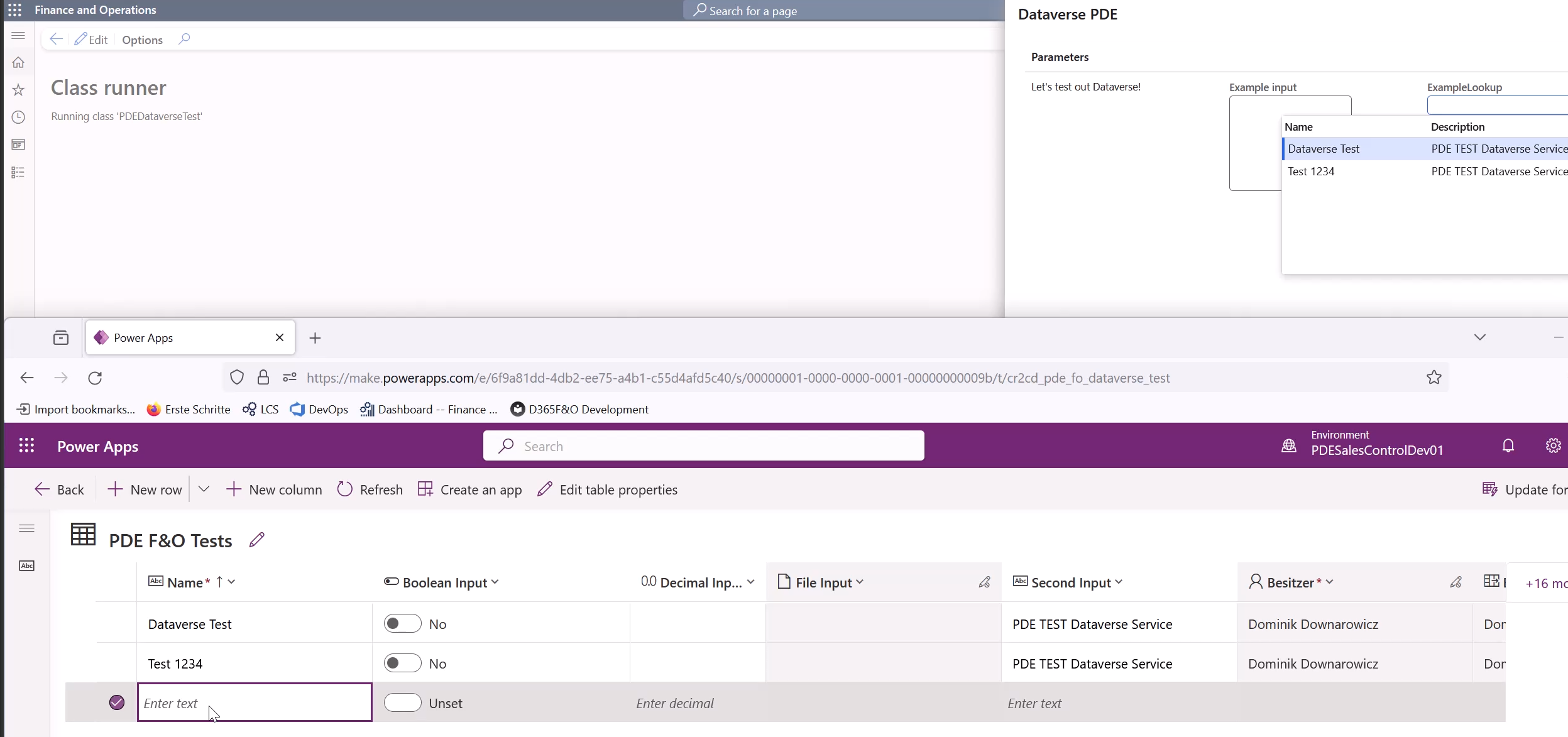
<p>I posted a short video demonstrating my little runnable class example on <a href="https://www.linkedin.com/posts/activity-7152688922899234816-01yO?utm_source=share&amp;utm_medium=member_desktop">LinkedIn</a>.</p>

<p><img src="/assets/img/IOrganizationServiceExample.png" alt="Example" width="70%" /></p>

<p>Link to my <a href="https://community.dynamics.com/blogs/post/?postid=d5bfeb7e-99bb-ee11-92bd-000d3a01c528">Microsoft Dynamics 365 blog entry</a></p>

<h2 id="code-example">Code example</h2>

<div class="language-text highlighter-rouge"><div class="highlight"><pre class="highlight"><code>using Microsoft.Xrm.Sdk;
internal final class PDEDataverseTest
{
    Dialog dialog;
    DialogField inputField;
    DialogField lookupTest;
    IOrganizationService cds;
    private const str consumerName = 'PDE Dataverse Test';
    public static void main(Args _args)
    {
        new PDEDataverseTest().run();
    }

    public void run()
    {
        cds = PDEDataverseTest::getOrganizationServiceForCurrentUser(consumerName);
        dialog = new Dialog("Dataverse PDE");
        dialog.form().design().dialogSize(DialogSize::Large);
        dialog.addText("Let's test out Dataverse!");
        inputField = dialog.addField(extendedTypeStr(WebText), "Example input");
        inputField.multiLine(true);
        inputField.enabled(true);
        inputField.widthMode(240);
        lookupTest = dialog.addField(extendedTypeStr(String30), "ExampleLookup");
        lookupTest.registerOverrideMethod(methodStr(FormStringControl, lookup), methodStr(PDEDataverseTest, lookupCDS), this);
        lookupTest.enabled(true);

        dialog.run();
        if(dialog.closedOk())
        {
            Info(strFmt("Input: %1, Lookup: %2", inputField.value(), lookupTest.value()));
            try
            {

                Microsoft.Xrm.Sdk.Entity testEntity = new Entity("cr2cd_pde_fo_dataverse_test");
                Microsoft.Xrm.Sdk.AttributeCollection attr = testEntity.Attributes;
                attr.Add("cr2cd_name",inputField.value());
                attr.Add("cr2cd_secondinput","PDE TEST Dataverse Service");
                testEntity.Attributes = attr;
                cds.Create(testEntity);
            }
            catch (Exception::CLRError)
            {
                System.Exception ex = CLRInterop::getLastException();
                error(ex.Message);
            }
        }

    }
    public void lookupCDS(FormStringControl _control)
    {
        SysDataverseLookup lookup = SysDataverseLookup::construct(_control, 'cr2cd_pde_fo_dataverse_test');

        // Set the org service explicity since implicit connects are not yet allowed
        lookup.parmOrgService(cds);
        lookup.addLookupColumn('cr2cd_name', Types::String, "@SYS7399");
        lookup.addLookupColumn('cr2cd_secondinput', Types::String, "@SYS7576");
        lookup.performLookup();
    }
    internal static IOrganizationService getOrganizationServiceForCurrentUser(str _consumerName)
    {
        if (!SysDataverseUtility::IsDataverseLinked())
        {
            throw error("Not Dataverse environment linked!");
        }
        try
        {
            var ret = SysDataverseUtility::GetOrganizationServiceForCurrentUser(_consumerName);
            if (ret == null)
            {
                throw error("Dataverse impersonation is not enabled!");
            }
            else
            {
                return ret;
            }
        }
        catch (Exception::CLRError)
        {
            throw error("Dataverse not available!");
        }

    }
}
</code></pre></div></div>]]></content><author><name>Dominik Downarowicz</name></author><summary type="html"><![CDATA[Use the IOrganizationService connection to interact with Dataverse]]></summary></entry><entry><title type="html">Big O Notation</title><link href="https://downardo.at/2023/10/13/BigONotation/" rel="alternate" type="text/html" title="Big O Notation" /><published>2023-10-13T00:00:00+00:00</published><updated>2023-10-13T00:00:00+00:00</updated><id>https://downardo.at/2023/10/13/BigONotation</id><content type="html" xml:base="https://downardo.at/2023/10/13/BigONotation/"><![CDATA[<h2 id="alogrithm">Alogrithm</h2>

<p>Alogrithms are a collection or set of defined instructions for solving a specific problem. As we know there are many ways to solve a problem. So we get the correct solution but the way how it is solved may differ. For many people it would be enough to get the correct result.
So we can not evaluate the result of the alogirhtm because it needs to be correct, otherwise there would be already a problem with the alogrithm. So we have to evalute the <strong>performance and efficiency (the time it will take for your algorithm to run/execute and the total amount of memory it will consume)</strong> of the alogrithm.
This is very important for developers to find out how the alogirthm is going to performe, how it is going to scale and it helps the developer to write clean code.</p>

<p>And for that reason we have the Big O Notation.</p>

<h2 id="big-o-notation">Big O Notation</h2>

<p>The Big O Notation describes the worst case scenario of how complex our algorithm is. Big O defines how the performance is going to change if we are going to increase the input size for the alogrithm. But it does not tell you how fast the alogrithm is going to run. In the time complexity it can tell you about how long it is going to run.
Big O notation uses algebraic expressions to describe the complexity of the alogrithm.
It measures the efficiency and performance of your algorithm using time and space complexity. So the space complexity is going to tell you how much memory is going to be used to execute the alogrithm. And the time complexity goint to tell you how long the alogrithm is going to run.</p>

<p>For my work and for many other developers it is important to have a look a the time complexity of their algorithms.</p>

<p>Nice StackOverFlow post that explains Big O notations really handy: <a href="https://stackoverflow.com/questions/2307283/what-does-olog-n-mean-exactly">https://stackoverflow.com/questions/2307283/what-does-olog-n-mean-exactly</a></p>

<p>Here are some of the most important examples for Big O notations and there are many others, but these should be enough for the beginning.</p>

<h3 id="o1---constant-time">O(1) -&gt; Constant Time</h3>

<p>Algorithms described as O(1) have <strong>no growth rate, meaning they don’t take longer the larger their input gets</strong>. Their growth rate is classed as constant.
For example accessing an array and returing an element at a specific index, will always have the same constant time complexity independet of the array size (the amounts of entries in the array).
Another example would be the inserting of an element into the list or similar things.</p>

<p><strong>O(1)</strong> would be the best case scenario for an alogrithm.</p>

<h3 id="on---linear-time">O(n) -&gt; Linear Time</h3>

<p>Algorithms described as <strong>O(n)</strong> have a linear growth rate. They need to go through the whole data input in the worst case scenario. So the time to complete the alogrithm grows linear with the size of the input. An algorithm that has to go through an entire data set once before completing is likely to be classed as <strong>O(n)</strong>.</p>

<h3 id="ologn---logarithmic-time">O(log(n)) -&gt; Logarithmic Time</h3>

<p>This is similar to linear time complexity, except that the runtime does not depend on the input size but rather on half the input size. The time taken to complete only increases each time the input size doubles, which means as the input size grows substantially the algorithm’s time taken to complete only increases a little.</p>

<p>This method is the second best because your program runs for half the input size rather than the full size. After all, the input size decreases with each iteration.</p>

<p>A great example is binary search functions for sorted arrays. It begins by going to the middle of the array and deciding to take the upper or lower part of the array. In one iteration (run) it instantly knows it can ignore one half of the current array.</p>

<h3 id="on-logn---logarithmic-time">O(n log(n)) -&gt; Logarithmic Time</h3>

<p>This is where many of the famous sorting algorithms land on the Big O spectrum. Algorithms defined as O(n log n) have a similar growth rate to <strong>O(n)</strong> except that it’s multiplied by the log of number of elements in the data set.</p>

<p>Example O(n log(n)) would be some sorting alogrithms like the famous <strong>mergesort</strong>. So lets take an alogrithm that loops through the whole array and for each iteration it does something with other elements in the array, that would be <strong>O(n^2)</strong>. But the alogrithm only does something we a specific selection of the array. The algorithm has some way of deciding about which elements to look at and which he currently does not need. And that would be then <strong>O(n log(n))</strong>.</p>

<h3 id="o2n---exponential-time">O(2^n) -&gt; Exponential Time</h3>

<p>Algorithms with running time O(2^N) are often recursive algorithms. So with each added item to the input the time to complete is going to double. For example the recursive algorithms are going to solve a problem of the input size by recursively solving two problems with a smaller input size than before until they reach the end.</p>

<p>For example the recursivly calculation of Fibonacci numbers.</p>

<h3 id="on2---quadratic-time">O(n^2) -&gt; Quadratic Time</h3>

<p>If a function loops over a dataset and with each item also does something with every other item, you’re looking at O(n^2). Because of how fast the time to complete can grow, this isn’t considered efficient. For example you have two nested loops. The inner loop has to run <strong>n</strong> times and the outer loop has to run <strong>n</strong> time for each iteration of the inner loop.</p>]]></content><author><name>Dominik Downarowicz</name></author><summary type="html"><![CDATA[Big O Notation is used to describe how long an alogrithm will take to run in the worst case scenario.]]></summary></entry><entry><title type="html">AX2009 Create picking list</title><link href="https://downardo.at/2023/08/25/PicklingListByCode/" rel="alternate" type="text/html" title="AX2009 Create picking list" /><published>2023-08-25T00:00:00+00:00</published><updated>2023-08-25T00:00:00+00:00</updated><id>https://downardo.at/2023/08/25/PicklingListByCode</id><content type="html" xml:base="https://downardo.at/2023/08/25/PicklingListByCode/"><![CDATA[<h2 id="create-a-picking-list-for-all-positions-in-the-sales-order">Create a picking list for all positions in the sales order</h2>

<p>With the following code sample you can create a picking list for all sales positions in the sales order.
The SalesUpdate parameter defines the selected quantities from the sales order. In the case of a picking list we want to select all quantities. For example in the case of the invoice document we want to select the SalesUpdate as PackingSlip so you only invoice positions that have been delivered.</p>

<div class="language-text highlighter-rouge"><div class="highlight"><pre class="highlight"><code>static void down1_createSalesPickingList(Args _args)
{
    SalesTable ltabSalesTable = SalesTable::find("A221624845");
    SalesFormLetter lclsSalesFormLetter;
    ;
    if(ltabSalesTable){
        lclsSalesFormLetter = SalesFormLetter::construct(DocumentStatus::PickingList);
        // SalesUpdate - All, DeliverNow, PackingSlip, PickingList
        lclsSalesFormLetter.update(ltabSalesTable, systemDateGet(), SalesUpdate::All);
    }
}
</code></pre></div></div>

<h2 id="create-a-picking-list-for-only-certain-positions">Create a picking list for only certain positions</h2>

<p>Currently I do not know how to create a picking list by code for certain sales order positions. I once saw on an another blog some aproach by modifing the salesparm table before running the SalesFormLetter class. So let’s go throught that aproach.</p>

<p>So we create the pickling list still with the SalesFormLetter class but we performe the <strong><em>update()</em></strong> (see the previous job) methode manually and before calling <strong><em>run()</em></strong> we edit the <strong>SalesParmLine</strong>.</p>

<div class="language-text highlighter-rouge"><div class="highlight"><pre class="highlight"><code>static void down1_createSalesPickingListLine(Args _args)
{
    SalesTable ltabSalesTable = SalesTable::find("A221624845");
    SalesFormLetter lclsSalesFormLetter;
    SalesParmLine ltabSalesParmLine;
    InventTable ltabInventTable;
    ;
    lclsSalesFormLetter = SalesFormLetter::construct(DocumentStatus::PickingList);


    lclsSalesFormLetter.salesTable(ltabSalesTable);

    lclsSalesFormLetter.transDate(systemDateGet());
    lclsSalesFormLetter.specQty(SalesUpdate::All);
    lclsSalesFormLetter.proforma(lclsSalesFormLetter.salesParmUpdate().Proforma);
    lclsSalesFormLetter.printFormLetter(lclsSalesFormLetter.printFormLetter());
    lclsSalesFormLetter.printCODLabel(NoYes::No);
    lclsSalesFormLetter.printShippingLabel(NoYes::No);
    lclsSalesFormLetter.printEntryCertificate_W(NoYes::No);
    lclsSalesFormLetter.printShippingLabel(NoYes::No);
    lclsSalesFormLetter.usePrintManagement(false);
    lclsSalesFormLetter.creditRemaining(lclsSalesFormLetter.creditRemaining());

    lclsSalesFormLetter.createParmUpdate();

    lclsSalesFormLetter.initParameters(
        lclsSalesFormLetter.salesParmUpdate(),
        Printout::Current);

    lclsSalesFormLetter.initLinesQuery();

    lclsSalesFormLetter.giroType(ltabSalesTable.GiroType);

    // Delete unwanted records in SalesParmLine
    while select forupdate ltabSalesParmLine
        where ltabSalesParmLine.ParmId == lclsSalesFormLetter.parmId()
            join ltabInventTable
            where ltabInventTable.ItemId == ltabSalesParmLine.ItemId
    {
        // Select lines to delete as an example
        if(ltabInventTable.DimGroupId == "LPGS"){
            ltabSalesParmLine.delete();
        }
    }

    lclsSalesFormLetter.run();
}
</code></pre></div></div>

<h2 id="create-a-pickling-list-for-multiple-sales-orders">Create a pickling list for multiple sales orders</h2>

<div class="language-text highlighter-rouge"><div class="highlight"><pre class="highlight"><code>static void down1_createSalesPickingListQuery(Args _args)
{
    SalesFormLetter lclsSalesFormLetter;
    Query   lclsQuery;
    QueryRun lclsQueryRun;
    ;
    lclsSalesFormLetter = SalesFormLetter::construct(DocumentStatus::PickingList);
    lclsQuery = new Query(QueryStr(SalesUpdate));
    lclsQuery.dataSourceTable(tablenum(SalesTable)).addRange(fieldnum(SalesTable, SalesId)).value("A221624845, A221624846, A221624847");
    lclsQueryRun = new QueryRun(lclsQuery);

    lclsSalesFormLetter.chooseLinesQuery(lclsQueryRun);


    lclsSalesFormLetter.transDate(systemDateGet());
    lclsSalesFormLetter.specQty(SalesUpdate::All);
    lclsSalesFormLetter.proforma(lclsSalesFormLetter.salesParmUpdate().Proforma);
    lclsSalesFormLetter.printFormLetter(lclsSalesFormLetter.printFormLetter());
    lclsSalesFormLetter.printCODLabel(NoYes::No);
    lclsSalesFormLetter.printShippingLabel(NoYes::No);
    lclsSalesFormLetter.printEntryCertificate_W(NoYes::No);
    lclsSalesFormLetter.printShippingLabel(NoYes::No);
    lclsSalesFormLetter.usePrintManagement(false);
    lclsSalesFormLetter.creditRemaining(lclsSalesFormLetter.creditRemaining());

    lclsSalesFormLetter.createParmUpdate();

    lclsSalesFormLetter.chooseLines(null, true);
    lclsSalesFormLetter.reArrangeNow(false);

    lclsSalesFormLetter.run();
}
</code></pre></div></div>]]></content><author><name>Dominik Downarowicz</name></author><summary type="html"><![CDATA[How to create a picking list in AX2009/AX2012 from X++ code.]]></summary></entry><entry><title type="html">D365 F&amp;amp;O Custom Work Types</title><link href="https://downardo.at/2023/08/12/CustomWorkTypes/" rel="alternate" type="text/html" title="D365 F&amp;amp;O Custom Work Types" /><published>2023-08-12T00:00:00+00:00</published><updated>2023-08-12T00:00:00+00:00</updated><id>https://downardo.at/2023/08/12/CustomWorkTypes</id><content type="html" xml:base="https://downardo.at/2023/08/12/CustomWorkTypes/"><![CDATA[<p>D365 F&amp;O offers you the possibilty to customize many processes in your warehouse. One possibility to do it is using custom work types. Typically you would use for the picking work template, work types of ‘Pick’ and ‘Put’. But you can added the type ‘Custom’. Such step would allow the warehouser worker to record information or updating some information.</p>

<h2 id="custom-work-type">Custom Work Type</h2>

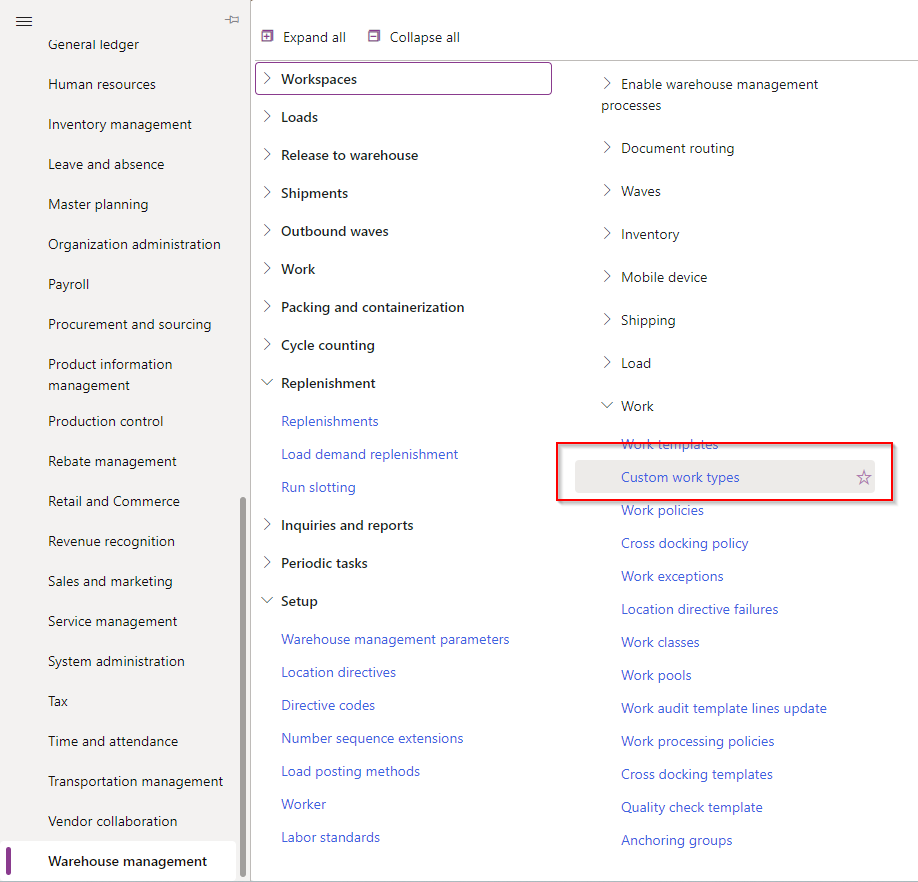
<p>You can find the custom work types under: <strong>Warehouse amanagement -&gt; Setup -&gt; Work -&gt; Custom work types</strong></p>

<p><img src="/assets/img/MenuCustomWorkTypes.png" alt="Menu D365 Custom Work Types" /></p>

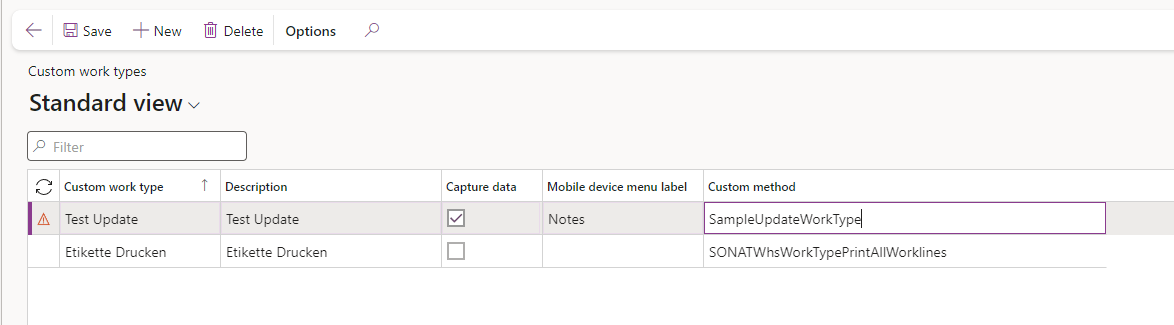
<p>There you can add new a custom work type for your system. The checkbox <strong>Capute data</strong> indicates if there should be an user input on that work type and <strong>Mobile device menu label</strong> is the text that is displayed on the form.</p>

<p><img src="/assets/img/CustomWorkTypeExample.png" alt="Custom Work Type Form" /></p>

<p>Under <strong>Custom method</strong> you can add your custom method that should be executed.</p>

<h2 id="custom-method">Custom method</h2>

<p>Below you can see a example code for a custom work type. You need to implement <strong>WhsIWorkTypeCustomProcessor</strong> and do not forget to decorate the class with <strong>WhsWorkTypeCustomProcessorFactor</strong> and add as the parameter the custom method name of the corresponding custom work type you created or going to create.
And then you can add your code that should be executed in the <strong>process</strong> function. You can read out over <strong>_parameters</strong> different data. Like for example the workline or the captured data from the work only if you checked <strong>Capture data</strong>.</p>

<p>Have fun :smile:</p>

<div class="language-text highlighter-rouge"><div class="highlight"><pre class="highlight"><code>[WhsWorkTypeCustomProcessorFactory('SampleUpdateWorkType')]
public class SampleUpdateWorkType implements WhsIWorkTypeCustomProcessor
{
    #WHSRF

    public void process(WhsWorkTypeCustomProcessParameters _parameters)
    {
        WHSWorkId currentWorkId = _parameters.workLine.WorkId;
        var userId              = _parameters.pass.lookup(#UserId);
        str notes               = _parameters.data;

        //DO SOMETHING WITH THE DATA

    }

}
</code></pre></div></div>]]></content><author><name>Dominik Downarowicz</name></author><summary type="html"><![CDATA[Create custom work types in D365 SCM to capture data during picking or make updates to data.]]></summary></entry><entry><title type="html">AX2009 Cancel SalesOrder with empty SalesLine</title><link href="https://downardo.at/2023/08/05/CancelSalesOrderWithoutPosition/" rel="alternate" type="text/html" title="AX2009 Cancel SalesOrder with empty SalesLine" /><published>2023-08-05T00:00:00+00:00</published><updated>2023-08-05T00:00:00+00:00</updated><id>https://downardo.at/2023/08/05/CancelSalesOrderWithoutPosition</id><content type="html" xml:base="https://downardo.at/2023/08/05/CancelSalesOrderWithoutPosition/"><![CDATA[<h2 id="description">Description</h2>

<p>One customer had the the problem, that some of their sales employees cancelled sales orders that they created by deleting all sales lines and letting the sales order open.
So now the customer had the problem that they had many sales orders open, and all the queries in their batch job selected more and more orders to check them. So some batches were taking much longer. To solve the problem I wrote a job that selectes all open sales orders (status = backorder) with a position count of 0 (sales line count). For the sales line count I used a already made function by use in the SalesTable controller class.</p>

<div class="language-text highlighter-rouge"><div class="highlight"><pre class="highlight"><code>public RefRecId getPositionCount()
{
    SalesLine     ltabSalesLine;
    ;

    select count (RecId) from ltabSalesLine
           where ltabSalesLine.SalesId == mtabSalesTable.SalesId;

    return ltabSalesLine.RecId;
}
</code></pre></div></div>

<p>After finding a sales order for that, the script creates a new sales line entry with one of our dummy items (999999999). And after that we cancel the appropriate position in the system. The part <strong>InterCompanyUpdateRemPhys::synchronize</strong> is needed to update sales remain amount in the sales line. It is doing exactly the same, as the form <strong>SalesUpdateRemain</strong> in AX2009. As the difference from remain qty to 0 (delta) is remain qty, I only took the entry <strong>ledtQtyDifference = ltabSalesLine.RemainSalesPhysical;</strong>.
For our case with inserting a sales line and cancelling it that is enough, but in other scenarions you need to differenciate between <em>remain invent physical</em> and <em>remain sales physical</em>. Have fun :smile:</p>

<h2 id="ax2009-job">AX2009 Job</h2>

<div class="language-text highlighter-rouge"><div class="highlight"><pre class="highlight"><code>static void down1_AuftragStornieren(Args _args)
{
    //A200513157
    SalesTable  ltabSalesTable;
    SalesLine   ltabSalesLine;
    InventTable ltabInventTable;
    InventDim   ltabInventDim;
    Qty         ledtQtyDifference;
    ;

    while select forupdate ltabSalesTable where  ltabSalesTable.SalesType == SalesType::Sales &amp;&amp; ltabSalesTable.SalesStatus == SalesStatus::Backorder{
        if(ltabSalesTable.axpController().getPositionCount() == 0 &amp;&amp; DateTimeUtil::date(ltabSalesTable.createdDateTime) &lt; mkdate(01,01,2021)){

            ttsbegin;
            ltabSalesLine.initValue();

            ltabSalesLine.SalesId = ltabSalesTable.SalesId;
            ltabSalesLine.initFromSalesTable(ltabSalesTable);

            ltabSalesLine.ItemId = '999999999';

            ltabInventDim.clear();
            ltabInventTable = InventTable::find(ltabSalesLine.ItemId);
            ltabInventDim.initFromInventTable(ltabInventTable);
            ltabInventDim = InventDim::findOrCreate(ltabInventDim);
            ltabSalesLine.InventDimId = ltabInventDim.inventDimId;

            ltabSalesLine.SalesQty =  1;

            ltabSalesLine.CreateLine(NoYes::Yes,NoYes::Yes,NoYes::Yes,NoYes::Yes,NoYes::Yes,NoYes::Yes,NoYes::Yes);
            ttscommit;


            while select forUpdate ltabSalesLine
           where ltabSalesLine.SalesId      == ltabSalesTable.SalesId
              &amp;&amp; ltabSalesLine.SalesStatus  == SalesStatus::Backorder
              &amp;&amp; ltabSalesLine.RemainSalesPhysical != 0
            {
                ledtQtyDifference = ltabSalesLine.RemainSalesPhysical;
                ltabSalesLine.RemainSalesPhysical   = 0;
                ltabSalesLine.RemainInventPhysical  = 0;

                if (ltabSalesLine.validateWrite() &amp;&amp; ltabSalesLine.salesTable().checkUpdate())
                {
                    InterCompanyUpdateRemPhys::synchronize(ltabSalesLine,
                                                           ledtQtyDifference,
                                                           ledtQtyDifference);
                    ltabSalesLine.write();
                }
            }

        }
    }

}
</code></pre></div></div>]]></content><author><name>Dominik Downarowicz</name></author><summary type="html"><![CDATA[With the help of this job, you can cancel a sales order that has an empty salesline]]></summary></entry><entry><title type="html">AX2009 Recalculate Vendor Cash Disc</title><link href="https://downardo.at/2023/07/28/RecalcVendCashDisc/" rel="alternate" type="text/html" title="AX2009 Recalculate Vendor Cash Disc" /><published>2023-07-28T00:00:00+00:00</published><updated>2023-07-28T00:00:00+00:00</updated><id>https://downardo.at/2023/07/28/RecalcVendCashDisc</id><content type="html" xml:base="https://downardo.at/2023/07/28/RecalcVendCashDisc/"><![CDATA[<h2 id="description">Description</h2>

<p>With this job you can recalculate the cash disc amount in the vendor open transactions. You can change the query to filter different transactions.</p>

<h2 id="ax2009-job">AX2009 Job</h2>

<div class="language-text highlighter-rouge"><div class="highlight"><pre class="highlight"><code>static void down1_VendRecalcCashDisc(Args _args)
{
    VendTransCashDisc   ltabVendTransCashDisc;
    VendTransOpen       ltabVendTransOpen;
    VendTrans           ltabVendTrans;
    VendInvoiceJour     ltabVendInvoiceJour;
    int                 i;
    ;

    while select ltabVendTrans
           where ltabVendTrans.CashDiscCode != ""
//&amp;&amp; (ltabVendTrans.AmountCur &gt; 0.36 || ltabVendTrans.AmountCur &lt; -0.36)
            join ltabVendTransOpen
           where ltabVendTransOpen.RefRecId == ltabVendTrans.RecId
  notexists join ltabVendTransCashDisc
           where ltabVendTransCashDisc.RefTableId       == ltabVendTransOpen.TableId
              &amp;&amp; ltabVendTransCashDisc.RefRecId         == ltabVendTransOpen.RecId
              &amp;&amp; ltabVendTransCashDisc.CashDiscAmount   != 0
    {
        ltabVendInvoiceJour = VendInvoiceJour::findFromVendTrans(ltabVendTrans.Invoice, ltabVendTrans.TransDate, ltabVendTrans.AccountNum);

        info(ltabVendTrans.AccountNum + " " + ltabVendTrans.Invoice + " " + ltabVendInvoiceJour.createdBy);

        ltabVendTransCashDisc.calcCashDisc(ltabVendTrans.CurrencyCode, ltabVendTrans.AmountCur, ltabVendTrans.DueDate,
            ltabVendTrans.DocumentDate ? ltabVendTrans.DocumentDate : ltabVendTrans.TransDate,
            ltabVendTrans.CashDiscCode, ltabVendTransOpen.TableId, ltabVendTransOpen.RecId);

        if (ltabVendTrans.AmountCur &lt; -1 || ltabVendTrans.AmountCur &gt; 1)
            i++;
    }
    info(strfmt("Count of mutated entries: %1",i));
}
</code></pre></div></div>]]></content><author><name>Dominik Downarowicz</name></author><summary type="html"><![CDATA[AX2009 Recalculate Vendor Cash Disc with X++]]></summary></entry><entry><title type="html">AX2009 Settle Customer Open Transcation</title><link href="https://downardo.at/2023/07/28/SettleCustTransOpen/" rel="alternate" type="text/html" title="AX2009 Settle Customer Open Transcation" /><published>2023-07-28T00:00:00+00:00</published><updated>2023-07-28T00:00:00+00:00</updated><id>https://downardo.at/2023/07/28/SettleCustTransOpen</id><content type="html" xml:base="https://downardo.at/2023/07/28/SettleCustTransOpen/"><![CDATA[<h2 id="description">Description</h2>

<p>We have sometimes the problem in AX2009 that a voucher was posted the settle an open transaction of a customer but only a partial amount has been settled. So the job search all open transaction that should have been closed and settles them.</p>

<h2 id="ax2009-job">AX2009 Job</h2>

<div class="language-text highlighter-rouge"><div class="highlight"><pre class="highlight"><code>static void down1_SettleCustOpenTransactions(Args _args)
{
    SpecTransManager    lclsSpecTransManager;
    CustTrans           ltabCustTrans, ltabCustTransSelect;
    CustTrans           ltabCustTransSecond;
    CustTransOpen       ltabCustTransOpen, ltabCustTransOpenSelect;
    CustSettlement      ltabCustSettlement;
    CustTable           ltabCustTable;
    boolean             lbolSettle;
    Set                 lsetRecIds = new Set(Types::Int64);
    int                 i;
    ;

    while select ltabCustTable
     exists join ltabCustTransSelect
           where ltabCustTransSelect.AccountNum == ltabCustTable.AccountNum
     exists join ltabCustTransOpenSelect
           where ltabCustTransOpenSelect.AccountNum == ltabCustTable.AccountNum
              &amp;&amp; ltabCustTransSelect.RecId          == ltabCustTransOpenSelect.RefRecId
              &amp;&amp; ltabCustTransSelect.AmountCur      != ltabCustTransOpenSelect.AmountCur
    {
        i++; print i;
        lbolSettle = false;
        while select ltabCustTrans
               where ltabCustTrans.Invoice
                  &amp;&amp; ltabCustTrans.AccountNum   == ltabCustTable.AccountNum
                  &amp;&amp; ltabCustTrans.AmountCur    &gt;  0
                join firstOnly ltabCustTransOpen
               where ltabCustTransOpen.RefRecId == ltabCustTrans.RecId
                join firstOnly ltabCustSettlement
               where ltabCustSettlement.TransRecId  == ltabCustTrans.RecId
                join firstOnly ltabCustTransSecond
               where ltabCustTransSecond.AccountNum == ltabCustTrans.AccountNum
                  &amp;&amp; ltabCustTransSecond.Voucher    == ltabCustSettlement.OffsetTransVoucher
        {
            if (lsetRecIds.in(ltabCustTrans.RecId))
                continue;
            if (ltabCustTransOpen &amp;&amp; abs(ltabCustTrans.remainAmountCur()) &amp;&amp; abs(ltabCustTrans.remainAmountCur()) == abs(ltabCustTransSecond.remainAmountCur()))
            {
                lclsSpecTransManager = SpecTransManager::construct(ltabCustTable);
                lclsSpecTransManager.insert(curExt(), tableNum(CustTransOpen), ltabCustTransSecond.transOpen().RecId, ltabCustTransSecond.remainAmountCur(), ltabCustTransSecond.CurrencyCode);
                lclsSpecTransManager.insert(curExt(), tableNum(CustTransOpen), ltabCustTrans.transOpen().RecId, ltabCustTrans.remainAmountCur(), ltabCustTransSecond.CurrencyCode);
                lbolSettle = true;
            }
            lsetRecIds.add(ltabCustTrans.RecId);
        }
        if (lbolSettle)
        {
            info(ltabCustTable.AccountNum);
            CustTrans::settleTransact(ltabCustTable, null, true, SettleDatePrinc::SelectDate, systemDateGet());
        }
    }
}
</code></pre></div></div>]]></content><author><name>Dominik Downarowicz</name></author><summary type="html"><![CDATA[AX2009 Settle Customer Open Transcation with X++]]></summary></entry><entry><title type="html">AX2009 Restore deleted sales table without restoring sales line</title><link href="https://downardo.at/2023/07/27/RestoreSalesTable/" rel="alternate" type="text/html" title="AX2009 Restore deleted sales table without restoring sales line" /><published>2023-07-27T00:00:00+00:00</published><updated>2023-07-27T00:00:00+00:00</updated><id>https://downardo.at/2023/07/27/RestoreSalesTable</id><content type="html" xml:base="https://downardo.at/2023/07/27/RestoreSalesTable/"><![CDATA[<h2 id="problem">Problem</h2>

<p>There are sometimes constelations where the user deletes the header of the sales order (<strong>sales table</strong>), but AX2009 will not delete the appropiate sales line entries. So we end up with open sales line entries without the header. That causes some problems when posting invoices and so on.</p>

<h2 id="solution">Solution</h2>

<p>You could try to cancel the entries directly over AOT in the databrowser. But I went with the approach to restore the header of the salesorder from <strong>SalesTableDelete</strong> without restoring the sales lines. And after that the user can manually cancel the sales order.</p>

<h3 id="ax2009-job">AX2009 Job</h3>

<div class="language-text highlighter-rouge"><div class="highlight"><pre class="highlight"><code>static void down1_RestoreSalesTableWithoutSalesLine(Args _args)
{
    SalesTableDelete    ltabsalesTableDelete;
    SalesTable          ltabsalesTable;
    ;
    ltabsalesTableDelete = SalesTableDelete::find('A103990087', true);
    ttsbegin;
    switch (ltabsalesTableDelete.Cancelled)
    {
        case Voided::Voided :
            ltabsalesTable  = conpeek(ltabsalesTableDelete.SalesTable, 1);
            ltabsalesTable.insert();
            ltabsalesTableDelete.delete();
            break;
   }
   ttscommit;
}
</code></pre></div></div>]]></content><author><name>Dominik Downarowicz</name></author><summary type="html"><![CDATA[Restore deleted sales table without restoring sales line with X++]]></summary></entry><entry><title type="html">D365 F&amp;amp;O Replenishment Template Lines - set product queries by code</title><link href="https://downardo.at/2023/07/23/ReplenishmentTemplate/" rel="alternate" type="text/html" title="D365 F&amp;amp;O Replenishment Template Lines - set product queries by code" /><published>2023-07-23T00:00:00+00:00</published><updated>2023-07-23T00:00:00+00:00</updated><id>https://downardo.at/2023/07/23/ReplenishmentTemplate</id><content type="html" xml:base="https://downardo.at/2023/07/23/ReplenishmentTemplate/"><![CDATA[<h2 id="problem">Problem</h2>

<p>One of our clients was using AX2009 for the whole company and we had to migrate as soon as possible to D365 F&amp;O in the warehouse, because they had a strict deadline for the commissioning of a warehouse automation. The warehouse automation was developed to communicated with D365 F&amp;O and not AX2009. We were faced with one problem for the migration of the replenishment templates. I developed in AX2009 a custom solution for the warehouse replenishment (AX2009 did not have any solution for that), and simply said the manager of the warehouse had only to fill out a table with the itemid, size (if needed) and the min/max values. But to migrate the data for AX2009 to D365 was a bit problematic. Microsoft decide to us queries in D365 for thier replenishment product selection. I see that a great idea, but for the warehousing team and the lack of time to do a complete rethinking how replenising the locations should work, we need to migrate each replenishment line from AX2009 to D365. The warehousing team needed first to seperate the products into different replenishment zones, so that they can select which zone they want to replenish today. Each replenishment zone was one replenishment template header. I imported according to the replenishment zone segmentation all the lines with the correct amounts into the system over the data administration framework.</p>

<h2 id="solution">Solution</h2>

<p>As the company had many product like cables where we need the inventory dimension <strong>size</strong> and so we needed to differentiate between products and product variants. In the import file I already set the productquerymode correctly to <strong>item</strong> or <strong>variant</strong>. And in the description field of the replenishment template line I put only the <strong>itemid</strong> in it if it was and item and if it was and <strong>variant</strong>, it put the following string in it <strong>itemid|sizeid</strong>. So now my runnable class can readout if it is an item or variant and create the correct query for us.</p>

<p>The code can alos be run as a custom script!</p>

<div class="language-text highlighter-rouge"><div class="highlight"><pre class="highlight"><code>    /// &lt;summary&gt;
    /// Class entry point. The system will call this method when a designated menu
    /// is selected or when execution starts and this class is set as the startup class.
    /// &lt;/summary&gt;
    /// &lt;param name = "_args"&gt;The specified arguments.&lt;/param&gt;
    /// Dominik Downarowicz - down1 - 8th May 2023
    public static void main(Args _args)
    {
        WHSReplenishmentTemplateLine ltabWHSReplenishmentTemplateLine;
        QueryRun    lclsQueryRun;
        Query       lclsQuery;
        QueryBuildDataSource lclsQueryBuildDataSource,lclsQueryBuildDataSourceDim;
        container   lconItemInfo;
        int         lintCounter = 0;
        ;

        while select forupdate ltabWHSReplenishmentTemplateLine
        {

            //Differnece between Product and ProductVariant for BaseQuery
            if(ltabWHSReplenishmentTemplateLine.ProductQueryMode == WHSProductQueryMode::Item)
            {
                if (ltabWHSReplenishmentTemplateLine.ReplenFixedOnly)
                {
                    lclsQuery = new Query(queryStr(WHSInventTableFixedLoc));
                }
                else
                {
                    lclsQuery = new Query(queryStr(WHSInventTable));
                }
            }
            else if(ltabWHSReplenishmentTemplateLine.ProductQueryMode == WHSProductQueryMode::Variant)
            {
                if (ltabWHSReplenishmentTemplateLine.ReplenFixedOnly)
                {
                    lclsQuery = new Query(queryStr(WHSReleasedProductVariantsFixedLoc));
                }
                else
                {
                    lclsQuery = new Query(queryStr(WHSReleasedProductVariants));
                }
            }

            if(ltabWHSReplenishmentTemplateLine.ProductQueryMode == WHSProductQueryMode::Item)
            {
                lclsQueryBuildDataSource = lclsQuery.dataSourceTable(tableNum(InventTable));
                lclsQueryBuildDataSource.addRange(fieldNum(InventTable, ItemId)).value(ltabWHSReplenishmentTemplateLine.Description);
            }
            else if(ltabWHSReplenishmentTemplateLine.ProductQueryMode == WHSProductQueryMode::Variant)
            {

                //Split Description Line (ITEMID|SIZEID)
                if(strContains(ltabWHSReplenishmentTemplateLine.Description, '|'))
                {

                    lconItemInfo = str2con_RU(ltabWHSReplenishmentTemplateLine.Description, '|');


                    lclsQueryBuildDataSource = lclsQuery.dataSourceTable(tableNum(InventDimCombination));

                    lclsQueryBuildDataSource.addRange(fieldNum(InventDimCombination, ItemId)).value(conPeek(lconItemInfo, 1));

                    lclsQueryBuildDataSourceDim = lclsQueryBuildDataSource.addDataSource(tableNum(InventDim));
                    lclsQueryBuildDataSourceDim.relations(true);
                    lclsQueryBuildDataSourceDim.joinMode(JoinMode::ExistsJoin);
                    lclsQueryBuildDataSourceDim.addRange(fieldNum(InventDim, InventSizeId)).value(queryValue(conPeek(lconItemInfo, 2)));

                }
                else
                {
                    warning(strFmt("The Replenishment Template Line with the description %1 has an incorrect description", ltabWHSReplenishmentTemplateLine.Description));
                }

            }


            lclsQueryRun = new QueryRun(lclsQuery);


            //Differnece between Product and ProductVariant for QueryName
            if(ltabWHSReplenishmentTemplateLine.ProductQueryMode == WHSProductQueryMode::Item)
            {
                if (ltabWHSReplenishmentTemplateLine.ReplenFixedOnly)
                {
                    lclsQueryRun.name("@WAX:ProductQueryFixedLocations");
                }
                else
                {
                    lclsQueryRun.name("@SYP4980032");
                }
            }
            else if(ltabWHSReplenishmentTemplateLine.ProductQueryMode == WHSProductQueryMode::Variant)
            {
                if (ltabWHSReplenishmentTemplateLine.ReplenFixedOnly)
                {
                    lclsQueryRun.name("@WAX:ProductVariantQueryFixedLocations");
                }
                else
                {
                    lclsQueryRun.name("@SYP4980030");
                }
            }

            lclsQueryRun.saveUserSetup(false);

            ttsbegin;

            if(ltabWHSReplenishmentTemplateLine.ProductQueryMode == WHSProductQueryMode::Item)
            {
                ltabWHSReplenishmentTemplateLine.ItemQuery = lclsQueryRun.pack();
            }
            else if(ltabWHSReplenishmentTemplateLine.ProductQueryMode == WHSProductQueryMode::Variant)
            {
                ltabWHSReplenishmentTemplateLine.ProductVariantQuery = lclsQueryRun.pack();
            }
            ltabWHSReplenishmentTemplateLine.update();
            lintCounter++;
            ttscommit;
        }

        info(strfmt("Completed: Processed %1 Replenishment Template Lines", lintCounter));
    }
</code></pre></div></div>]]></content><author><name>Dominik Downarowicz</name></author><summary type="html"><![CDATA[Create product queries for D365 FO WHS replenishment template lines by code]]></summary></entry></feed>